Configuration · orbit.config.yaml
Collection rules
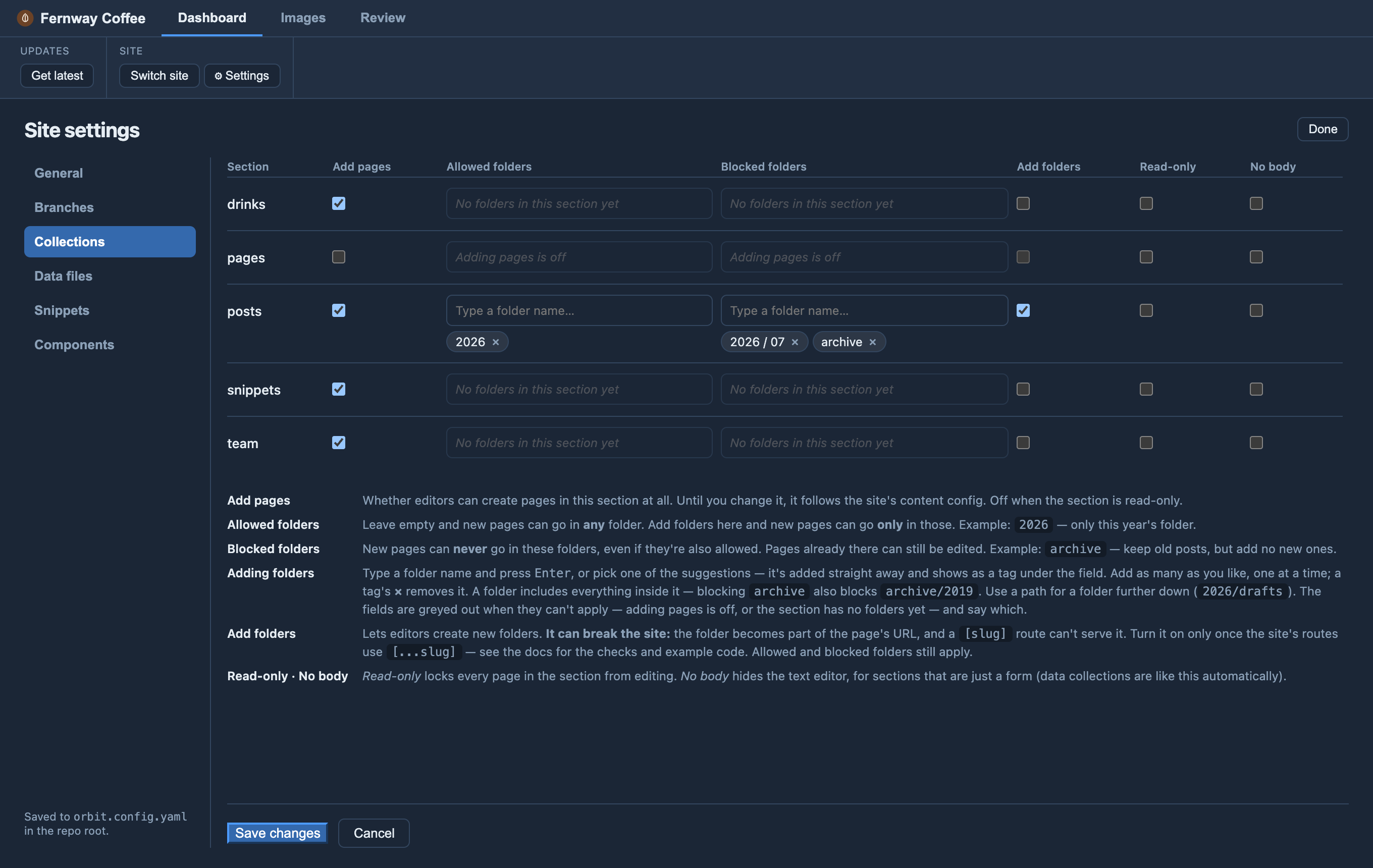
Rules for each section (collection), under collections.<name> in
orbit.config.yaml — or in Settings ▸ Collections.
-
collections.<name>.readOnlylocks editing;canAdd(Settings: Add pages) widens or narrows “new pages”;bodylesshides the body editor (also inferred for data collections and empty-body docs). -
collections.<name>.addTo/noAddTo(Settings: Allowed folders / Blocked folders) limit which folders take new pages. Each is a list of folder names relative to the collection; a folder includes everything inside it (archivealso coversarchive/2019), so there’s no/**to add. Use a path for a folder further down (2026/drafts)..means the top level only (pages in no folder) — set it here in the file; Settings doesn’t offer it. E.g.noAddTo: ["."]makes every new page go in a folder. List as many as you like (["archive", "drafts"]). LeaveaddToout to allow every folder;noAddToalways wins. (Glob patterns such as*/draftswork too.) A closed folder shows no new page / new folder icon (its existing pages stay editable), and a new page still follows the collection’s schema. You can set these in Settings ▸ Collections too. More, with examples: Folders that don’t take new pages. -
collections.<name>.newFolders: true(Settings: Add folders) lets editors start a new sub-folder with their first page in it (a new folder icon appears on the section and its folders). Off by default because it can break your site: the folder becomes part of the page’s ID and URL, and a[slug]route (or any code expecting one-level IDs) can’t serve it. Make your routes ready first — a[...slug]route and example code are in Letting editors create folders. Folder names are slugged;addTo/noAddToand the glob still apply (a*.mdcollection can’t take one). Also in Settings ▸ Collections. -
collections.<name>.url(Settings: Address) is where each page of the section lives on the site, so the Page tab’s Preview ↗ / Live ↗ buttons open the page itself rather than the home page. Start it with/;{slug}is the page’s name (a page in its own folder —hello/index.md— takes the folder’s name) and{path}adds any sub-folders (2024/hello). A folder’sindexpage is the folder’s own address. Examples:/blog/{slug},/docs/{path}/,/aboutfor a fixed page. Leave it out when addresses come from something else (a title, a date) — the buttons then open the home page. The site addresses themselves aresite.previewUrl/site.liveUrl(Settings ▸ General).